 KEY-IOT
How to Troubleshoot 5G Connectivity Issues in Autonomous Mining Trucks
المدونة 134

When an autonomous mining truck loses connectivity, the cause is not always a weak 5G signal. The problem may originate in the cellular network, SIM configuration, antenna installation, vehicle gateway, onboard network, or remote application.
These faults can produce similar symptoms. A truck may appear connected to the cellular network while operational data stops reaching the fleet management platform. In another case, connectivity may work well when the truck is stationary but become unstable along a particular haul route.
The most effective way to troubleshoot these issues is to examine the entire communication path, from the vehicle’s cellular connection to the application receiving its data.
This guide explains how to investigate common 5G connectivity problems in autonomous mining trucks, narrow down possible causes, and collect the information needed for further diagnosis.
Safety note: All testing, configuration changes, restarts, and communication interruption tests must follow the mine operator’s safety procedures and be performed by authorized personnel. Do not deliberately interrupt connectivity or modify communication equipment on an operating autonomous vehicle unless the test has been specifically approved and appropriate safeguards are in place. Restored network connectivity alone does not establish that an autonomous vehicle is safe to operate.
Common 5G Connectivity Problems in Autonomous Mining Trucks
Mining environments present several challenges for wireless communication. Large equipment, changing vehicle positions, terrain, metal structures, dust, vibration, and variable network coverage can all affect connectivity.
Before replacing hardware or changing network settings, identify the pattern of the failure.
| Observed symptom | Initial checks | What not to assume |
| Several trucks lose connectivity in the same area | Coverage information, cell availability, local radio conditions, and network-side alarms | The cellular network is necessarily the only cause |
| One truck has consistently weaker reception than others | Antenna placement, cables, connectors, modem status, and configuration | The vehicle gateway is defective |
| 5G signal appears strong, but data stops flowing | IP connectivity, routing, DNS, firewall rules, VPN status, and server reachability | Strong signal means the entire connection is healthy |
| Connection drops while the truck moves | Route-specific coverage, cell transitions, modem logs, and session recovery | Every disconnection is a handover failure |
| Gateway appears online, but the fleet platform shows stale data | Onboard interfaces, gateway processing, application sessions, and server-side ingestion | The cellular link is working end to end |
| Connectivity returns after a restart | Event logs, power supply, temperature, software state, and network recovery behavior | Restarting has identified or fixed the root cause |
This table is a starting point, not a substitute for testing. Several faults can occur together, so use evidence from each layer to narrow down the possibilities.
Check 5G Coverage and Signal Quality
The first step is to establish whether the problem is associated with radio coverage.
A truck may have a stable connection near a workshop or charging area but experience interruptions along a haul road, behind an embankment, or near large industrial structures. A single signal reading taken at the maintenance depot will not reveal these location-dependent problems.
Record radio measurements at the problem location
Where the modem or gateway exposes these measurements, record:
RSRP (Reference Signal Received Power): Indicates the received power of the relevant reference signal.
RSRQ (Reference Signal Received Quality): Provides information about reference-signal quality relative to the received signal conditions.
SINR (Signal-to-Interference-plus-Noise Ratio): Describes the desired signal relative to interference and noise.
These indicators help characterize the radio environment, but none should be treated as a complete measure of application performance.
For example, a truck may report reasonable RSRP while still experiencing poor throughput or unstable data delivery. Interference, network load, radio configuration, and problems elsewhere in the communication path may contribute to the symptoms.
Do not rely on a single universal threshold for every mining deployment. Interpret the readings against the modem manufacturer’s guidance, carrier requirements, deployment conditions, and actual service requirements.
Compare locations, routes, and vehicles
Collect measurements when the truck is stationary and, where safely permitted, at relevant points along its route. Record the time and vehicle location alongside radio readings and connection events.
If multiple trucks experience similar failures in the same area, investigate shared factors such as coverage, local radio conditions, and network infrastructure first. If one vehicle behaves differently from others operating under comparable conditions, examine its antenna installation, cabling, configuration, and hardware.
These patterns help prioritize investigations. They do not, by themselves, prove the root cause.
Diagnose Network Handover and Connection Drops
A moving truck may need to transition between cellular coverage areas. Depending on the deployment, the transition may involve changes in signal quality, network conditions, or the availability of a suitable serving cell.
If the connection drops repeatedly at particular points along a haul route, investigate the relationship between the failures and the vehicle’s location and movement.
Identify when the interruption occurs
Check whether the event happens:
At approximately the same location on repeated trips.
When the vehicle moves between different coverage areas.
During a change in serving cell or radio conditions.
At irregular intervals, including when the vehicle is stationary.
At the same time as a modem reset, power event, or software warning.
Repeated failures at the same location may indicate a coverage or radio-environment issue. Irregular failures may justify a broader investigation of the modem, power supply, configuration, and network service.
Separate network recovery from application recovery
A cellular connection can recover before the rest of the system resumes normal operation.
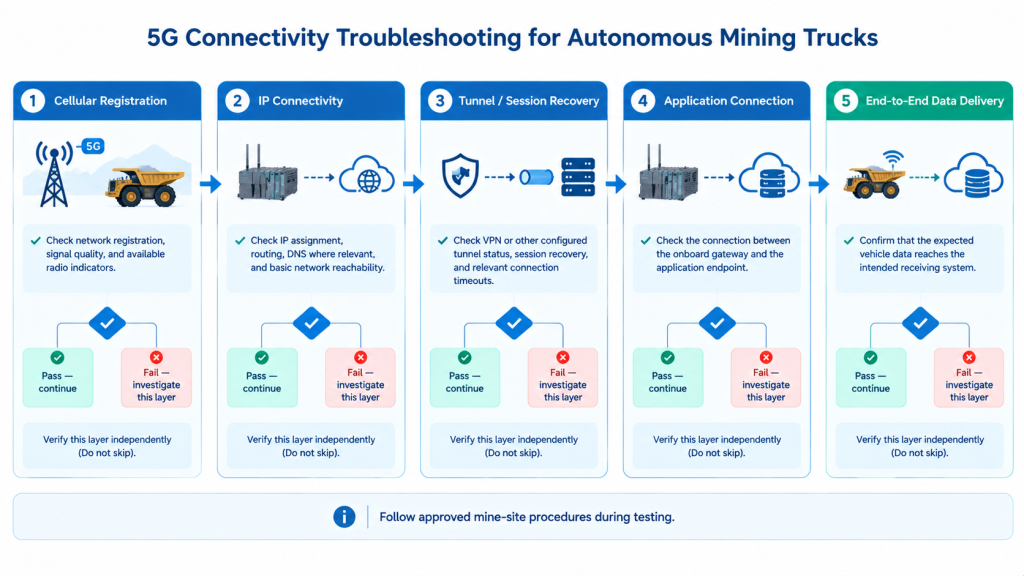
For useful diagnosis, distinguish between these stages:
Cellular registration: The modem registers with the mobile network.
IP connectivity: The device obtains or retains usable network connectivity and can reach relevant IP endpoints.
Tunnel or session recovery: Any required VPN, secure tunnel, or persistent connection is restored.
Application recovery: The fleet management application reconnects and resumes normal communication.
Data delivery: The expected data reaches the intended destination and is processed successfully.
A modem showing a registered state does not confirm that every subsequent stage is functioning.
Where the system supports event logging, compare timestamps from the modem, vehicle gateway, communication software, and remote application. Where possible, synchronize device clocks or record their time offsets before correlating logs.
Build a timeline covering the initial symptom, cellular state changes, IP recovery, application reconnection, and successful data delivery. This helps distinguish the first failure from subsequent recovery delays.
Check the SIM Card, Carrier Compatibility, and Configuration
SIM-related issues can cause registration failures, unexpected service restrictions, or inconsistent connectivity. They should be investigated alongside radio coverage and device compatibility.
Verify the SIM and network settings
Check the following items:
Whether the SIM is active and provisioned for the required service.
Whether the data plan and roaming permissions match the deployment.
Whether the APN, DNN, or carrier-provided data profile is configured correctly, as applicable to the modem and network deployment.
Whether the modem supports the required frequency bands and network configuration.
Whether the device is using the intended operator or network selection mode.
Whether network registration or authentication errors appear in the logs.
Frequency-band support alone does not guarantee compatibility with every operator configuration. Confirm the complete combination of device, carrier, SIM provisioning, and deployment requirements.
For 5G NSA deployments, also verify that the device supports the required LTE anchor and associated band combinations where applicable. The exact requirements depend on the modem and operator network.
Use controlled cross-testing
Where approved, compare the suspect SIM in a known-compatible device or test a known-good SIM in the affected equipment.
Interpret the results carefully. If a SIM fails in multiple compatible devices, investigate its provisioning and carrier service. If the affected gateway also fails with a known-good SIM, examine the gateway configuration, radio conditions, and hardware.
Cross-testing narrows the possible causes; it does not necessarily prove one. Keep test conditions as comparable as possible, including location, operator, APN or DNN, and supported network settings.
Understand dual-SIM and dual-modem configurations
Dual-SIM and dual-modem designs are not interchangeable.
A dual-SIM device may use two SIMs with a single cellular modem, depending on its architecture. A dual-modem device has two cellular modem paths, but its ability to maintain or switch connections depends on the hardware design, software, network configuration, and application requirements.
Neither arrangement automatically guarantees seamless handover, uninterrupted sessions, or zero packet loss.
When evaluating redundancy, check whether the two connectivity paths have independent failure domains. Consider carrier and coverage dependencies, modem and antenna architecture, shared power or gateway components, and the availability of remote network services.
For example, two SIMs using the same operator may both be affected by a local network outage. Two modem paths may also share a power supply, gateway, or remote service, leaving common points of failure.
Verify failover behavior through controlled testing under the intended deployment conditions. Evaluate how the system detects a failure, selects an alternate connection, restores sessions, and handles data during an interruption.
Inspect Antennas, Cables, and Vehicle Installation
Antenna problems can be difficult to distinguish from network coverage issues. Incorrect placement, damaged cables, loose connectors, and installation differences can reduce radio performance even when the modem itself is functioning normally.
Inspect the complete antenna path rather than replacing the router immediately.
Check the physical installation
Verify that:
The antenna system matches the device’s supported cellular bands and MIMO configuration.
Antenna connectors are the correct type, secure, and free from visible damage.
Cables are not crushed, sharply bent, abraded, or routed near likely sources of damage.
Antennas are installed according to the equipment manufacturer’s recommendations.
The mounting position is appropriate for the vehicle structure and surrounding metal surfaces.
The installation is consistent with the intended antenna configuration.
For multi-antenna 4G or 5G equipment, checking only the antenna type is insufficient. Antenna count, individual RF paths, cable loss, connector condition, and physical placement may all affect performance.
Do not assume that an antenna suitable for one vehicle will perform identically on another. Differences in mounting position, nearby metal structures, cable length, and installation quality can affect results.
Compare radio readings under comparable conditions
If one truck consistently performs worse than similar vehicles using the same network, compare antenna placement, cable routing, modem configuration, and signal readings.
Where qualified personnel and suitable procedures permit, a controlled antenna or cable substitution test may help isolate the issue. Record the original configuration before making changes, and avoid changing several variables at once.
Troubleshoot the Vehicle Gateway and Data Transmission Path
When radio measurements look reasonable but the expected data is missing, expand the investigation beyond the cellular connection.
In a typical vehicle connectivity setup, information may pass through onboard equipment, a vehicle gateway, the cellular network, a remote server, and a fleet management application. A failure at any point can prevent the final application from receiving data.
Trace the data path one stage at a time
Step 1: Confirm the onboard data source.
Check whether the source device, onboard computer, or vehicle system is generating the expected data. Verify the relevant interface status and communication parameters.
Step 2: Check the gateway interface.
Confirm that the connected Ethernet or other supported interface is active and that the gateway is receiving the expected data. Check IP addresses, subnet settings, routing, and VLAN configuration where applicable.
Step 3: Verify outbound connectivity.
Test reachability to the required remote endpoint using methods appropriate for the deployment. Review DNS resolution, firewall rules, routing, and any required VPN or secure tunnel.
A successful ping is useful evidence when supported, but it does not prove that an application service is healthy. Some systems also block ICMP traffic, so a failed ping alone does not establish that the endpoint is unavailable.
Step 4: Check the application connection.
If the network path is available but the fleet platform still shows stale data, examine application sessions, authentication, protocol configuration, server-side ingestion, and relevant service logs.
Step 5: Verify successful data delivery.
Where possible, compare timestamps or message identifiers at the source and destination. This helps distinguish between data that was never generated, data that was not transmitted, and data that reached the network but was not processed by the application.
This layered approach reduces unnecessary hardware replacement and helps direct the investigation toward the component supported by the evidence.
Investigate Power Supply, Temperature, and Vibration
Mining vehicles operate in demanding physical environments. Power instability, heat, vibration, and mechanical damage can cause intermittent communication faults that resemble cellular network problems.
Check the power supply
Review the gateway’s power input and operating specifications. Where suitable equipment is available, inspect the supply during startup, load changes, and reported failure periods.
Look for loose connections, damaged wiring, poor grounding, and supply conditions outside the device’s specified operating range. Do not assume that a normal reading taken after an incident rules out a brief power disturbance.
Review temperature and vibration conditions
Check whether failures correlate with prolonged operation, high ambient temperatures, equipment enclosures, or vehicle vibration.
Inspect mounting hardware, connectors, cables, and enclosure condition. Review device event logs for resets or temperature-related warnings where those diagnostics are available.
If communication returns after a restart, treat that as a clue rather than a diagnosis. The underlying cause could involve software state, power instability, overheating, or a network session that failed to recover correctly.
A Step-by-Step 5G Connectivity Troubleshooting Checklist
A repeatable workflow makes it easier to compare incidents and share findings among vehicle engineers, network operators, and equipment suppliers.
Step 1: Define the symptom
Record what failed: cellular registration, IP connectivity, remote access, application communication, or delivery of a specific data stream.
Step 2: Record the incident context
Capture the vehicle identifier, timestamp, approximate location, vehicle operating state, and whether other vehicles experienced similar symptoms.
Step 3: Collect available diagnostic evidence
Depending on the equipment, collect:
RSRP, RSRQ, and SINR readings.
Cellular registration and modem status.
Serving-cell information, where available.
SIM, APN or DNN, and network configuration.
Gateway interface and routing status.
VPN, application, and remote-server connection logs.
Power, temperature, and reset events.
Evidence of missing, delayed, or failed data delivery.
Use the device’s available diagnostic functions and follow applicable data-handling and access-control procedures.
Step 4: Compare the failure pattern
Check whether the problem follows a particular location, vehicle, operator, device, or operating condition.
Step 5: Test one variable at a time
Use controlled tests to evaluate likely causes. Document the original configuration and each change so that results can be compared and reproduced.
Step 6: Confirm recovery at the application level
Do not close the incident simply because the modem has re-registered. Verify that the required application communication and data delivery have resumed.
Step 7: Document the conclusion and remaining uncertainty
Record the evidence supporting the most likely cause, the corrective action, and any follow-up testing required. If the root cause remains uncertain, state that explicitly rather than treating a temporary recovery as proof.
Prevent Recurring 5G Connectivity Problems
Troubleshooting resolves individual incidents. Preventing repeated failures requires monitoring and maintenance appropriate to the deployment.
Consider the following practices:
Map recurring trouble spots: Maintain records of locations associated with repeated connection problems and review them against available network coverage information.
Monitor connection state: Where supported, track registration changes, disconnections, reconnect events, and device resets.
Measure end-to-end performance: Monitor application availability and data freshness rather than relying exclusively on radio indicators.
Maintain antenna and cable installations: Include connectors, mounting points, and cable condition in appropriate vehicle inspections.
Control configuration changes: Keep records of SIM settings, APN or DNN profiles, firmware versions, and network configuration changes.
Review incidents across the fleet: Compare vehicles and routes to identify common patterns that individual device logs may not reveal.
Define recovery requirements: Establish acceptable interruption and recovery behavior based on actual application requirements and safety procedures.
For larger fleets, remote monitoring, log collection, configuration management, and software maintenance capabilities may also help engineering teams investigate incidents. The available functions depend on the selected equipment and management platform, so confirm requirements against the actual product specifications.
Frequently Asked Questions
Why does a 5G router keep disconnecting in a mining truck?
Possible causes include changing coverage conditions, interference, network transitions, antenna installation, SIM or carrier configuration, power instability, and device faults. Start by checking whether the interruptions occur at repeatable locations or affect multiple vehicles, then compare modem and gateway logs with application events.
What is the difference between a cellular connection failure and an application failure?
A cellular failure may prevent the modem from registering or establishing network connectivity. An application failure can occur even when the cellular connection and IP path are available. Check each stage separately, including any VPN, persistent session, server connection, and successful data delivery.
What logs should engineers collect before contacting a 5G router supplier?
Collect the incident timestamp and location, device model and firmware version, SIM and carrier details, available radio measurements, modem registration events, interface and routing status, power or reset events, and relevant application logs. Include the observed symptom and any controlled tests already performed. Where possible, synchronize device clocks or record their offsets so that logs can be correlated accurately. Share configuration details securely and remove credentials or other sensitive information.
What should be evaluated when selecting a 5G router for mining vehicles?
Assess supported cellular bands and operator compatibility, antenna and MIMO requirements, onboard interfaces, environmental operating specifications, power requirements, remote diagnostics, and integration with the vehicle’s communication architecture. If redundancy is required, evaluate the independence of the connectivity paths and the actual failover behavior under expected operating conditions. Do not rely on the number of SIM slots or modems alone.
الخاتمة
Reliable 5G connectivity in autonomous mining trucks depends on more than signal strength. The cellular network, SIM configuration, antennas, power supply, vehicle gateway, and remote application all contribute to the final communication result.
A structured investigation helps engineers distinguish radio problems from gateway, network, and application failures. By recording incidents consistently, testing one variable at a time, and confirming recovery at the destination, teams can make better-supported decisions and reduce repeated troubleshooting.
Need a Vehicle Connectivity Solution for Mining Applications?
Selecting communication equipment for mining vehicles requires more than checking 5G signal strength. Cellular compatibility, antenna configuration, onboard interfaces, environmental requirements, redundancy expectations, and system integration all need to match the deployment.
The KEY-IOT team can discuss your vehicle connectivity requirements, interface configuration, and application environment to help determine which technical specifications need to be evaluated for your project.
 English
 Español de Perú
 Русский
 العربية
 日本語
日本語 简体中文
简体中文 Français
 Deutsch
 繁體中文
繁體中文